Educational Robots
Different Educational Robots

Students of all ages can learn more about robotics and programming while simultaneously developing other cognitive abilities thanks to educational robots. Children learn one of the fundamental cognitive abilities of computational thinking through play with educational robots. This aids in the development of the thought process that guides us in organising our actions to find solutions to a variety of situations.
Another significant advantage of educational robots is that they help kids learn the fundamentals of programming, a skill that is becoming more and more crucial every year. A startling statistic: according to the European Commission, there will be 825,000 empty positions in Europe by 2020 as a result of a shortage of ICT and computer science workers. Robotics are particularly helpful in the classroom since they can hold students' interest and serve as the ideal bridge between theory and practise in robotics.
Spike Prime/EV3
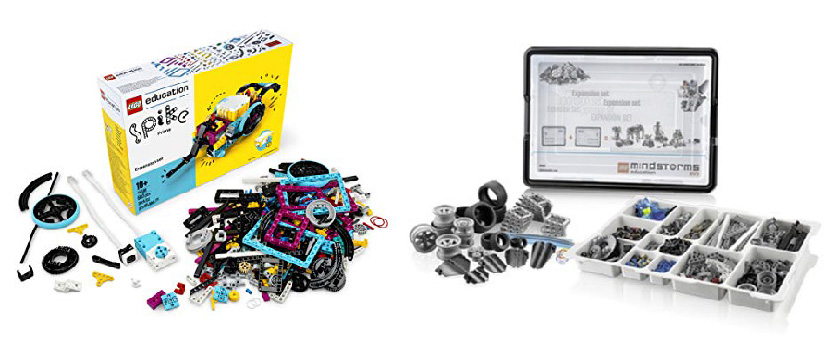
Lego Spike Prime is a STEAM teaching tool that offers engaging, multi-sensory coding lessons to help students learn and get ready for the workforce of the future.
With its simple-to-use hardware, stacking bricks, technical components, and sophisticated coding capabilities, Spike provides a great learning environment for developing critical thinking abilities. A work schedule for the Lego Spike Prime sets has been developed by the team at Lego Education.
These lesson plans offer engaging STEAM exercises that mix basic Lego blocks with an even more basic drag-and-drop coding language based on block. Every learning level of students can utilise the kit to tackle complex problems, and there are endless opportunities to broaden the curriculum. Spike is committed to igniting the creative minds of the future.
WeDo 2.0
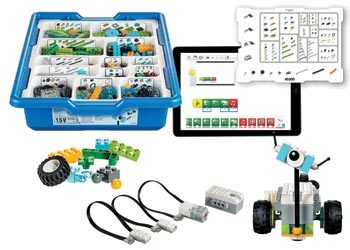
Lego WeDo was created especially for pupils in Early Years through year 3. It uses the same 4 C's procedure as other Lego Education products: Connect to a story, Construct a model, Consider its function, and Keep Improving Its Design.
The pupils can be led in a variety of methods as they progress through their studies. As an illustration, pick one of the 12 thematic activities. Then, as they collaborate while learning, students carefully follow the build process using the same Lego instructions we have grown accustomed to. When the models are programmed, the learning and enjoyment are increased. Students pick up on the basic click-and-drag iconography quickly, using a logical and sequential schema to activate a motor that may also be dependent on a sensor.
Mathematical operations and display effects are also available on LEGO's WeDo programming platform for more advanced and even older pupils in Years 4 and 5, serving as a stepping stone to developing games and entertainment.
Microbit

With the BBC micro:bit, a portable computer, you can learn how hardware and software interact. It includes several input/output characteristics, including buttons, sensors, and an LED light display that, when configured, allow it to interact with you and your environment.
A built-in speaker and microphone have been added to the new micro:bit with sound, along with an additional touch input button and a power button.
The micro:bit aids in your comprehension of how computers operate. You use an input device when you type on your laptop or touch the phone's screen. Computers can act and make things happen, usually on an output like a screen or headphones, by using inputs to sense what is happening in the real world.
The processor sits between the input and the output. This transforms data from inputs like buttons into actions on outputs like playing music through headphones.
Rasberry Pi
The Raspberry Pi Foundation, a UK nonprofit with the mission of promoting computer literacy and facilitating access to computer science education, is the manufacturer of the Raspberry Pi line of single-board computers.
Since the 2012 launch of the Raspberry Pi, numerous versions and variants have been made available. The most recent Pi model includes a quad-core CPU clocked at over 1.5GHz and 4GB RAM, while the first Pi featured a single-core 700MHz CPU and just 256MB RAM.
People use the Raspberry Pi all across the world to develop programming skills, create hardware projects, automate their homes, leverage Edge computing and Kubernetes clusters, and even use them in industrial applications.
In addition to being a relatively affordable Linux-running computer, the Raspberry Pi also offers a set of GPIO (general purpose input/output) pins that let you explore the Internet of Things and control electronic components for physical computing.
Arduino
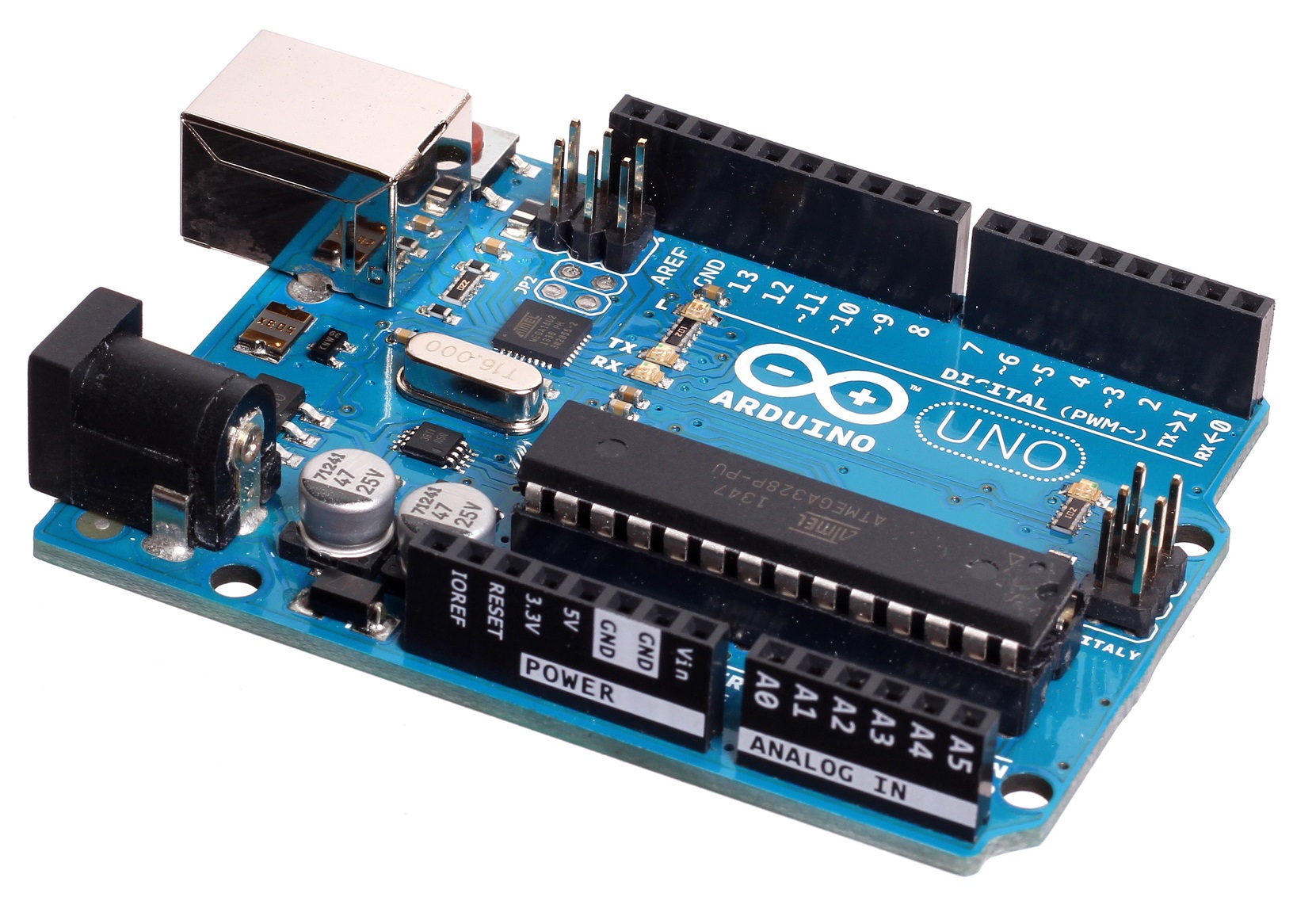
Arduino is a free and open-source electronics prototyping platform with a variety of hardware and software options. It's for artists, designers, amateurs, and anyone else who wants to make interactive things or surroundings. Arduino can perceive the world by receiving data from a number of sensors and control lights, motors, and other actuators to affect its surrounds. The Arduino programming language and development environment are used to programme the board's microcontroller. Arduino creations can operate independently or in conjunction with computer software.
Makey Makey

The Makey Makey invention kit is one for the twenty-first century. Make commonplace items into touchpads and use the internet to connect them. It's an easy-to-use invention kit for both amateurs and professionals who work in STEAM and other disciplines.
Students can use the Makey Makey to make any conductive material function as a computer's input device. Students who have never programmed before can use it and learn to explore with it as they begin to learn coding because it is preprogrammed.
Makey Makey is of the opinion that the Maker Movement encompasses more than just STEAM, robotics, 3D printing, and constructing stuff. By offering a setting that encourages curiosity and produces active learners, it enables students to become hardware engineers and address real-world design problems.
Rero

Rero is a reconfigurable robotic construction kit that makes use of a unique, screwless modular architecture that enables users to quickly and simply construct, disassemble, and rebuild a variety of robotic configurations. It is an instructional robot made to impart knowledge of coding and robotics.
Vex IQ

Through its free extra curriculum resources, VEX IQ is a plastic, toolless robotics system that can be used to teach Design & Technology, Computing, and the practical application of Math and Science. In the classroom or as part of an extracurricular challenge, students as young as 6 or 7 years old can design, construct, and programme robots. Robotics are brought to life through programming using C++ text or Scratch-powered Blocks. The usage of the hardware as an all-encompassing EdTech ecosystem is supported by free CPD (online teacher certification or in-person training), free software (VEXcode), and free content (STEM Labs).
Vex V5

VEX V5 (previously VEX EDR) is for ages 14+ students. Through its free supplemental curriculum resources, VEX V5 is a robotics system that can be used to educate Design & Technology, Engineering, Computing, and the practical application of Maths and Science. In the classroom or as part of an extracurricular competition, students from Key Stage 3 to University can design, build, and programme robots. Programming comes to life with real robots using Scratch-powered Blocks or C++ and Python text.
The utilisation of hardware as an all-encompassing EdTech ecosystem is supported by free curriculum (STEM Labs), free software (VEXcode), and free CPD (online teacher certification or face-to-face training).
AWS DeepRacer

AWS DeepRacer is an Amazon machine learning project that focuses on the creation of miniature autonomous racing cars. It is an autonomous 1/18th-scale race car made with the intention of testing RL models through competition on a real track. The car demonstrates how a model trained in a simulated environment can be applied to the real world by using cameras to view the track and a reinforcement model to manage the throttle and steering.
AWS DeepRacer is a "global racing league" that enables users to create vehicles, run simulators, and compete in the first autonomous racing league to gain practical experience with machine learning.
Dash & Dot
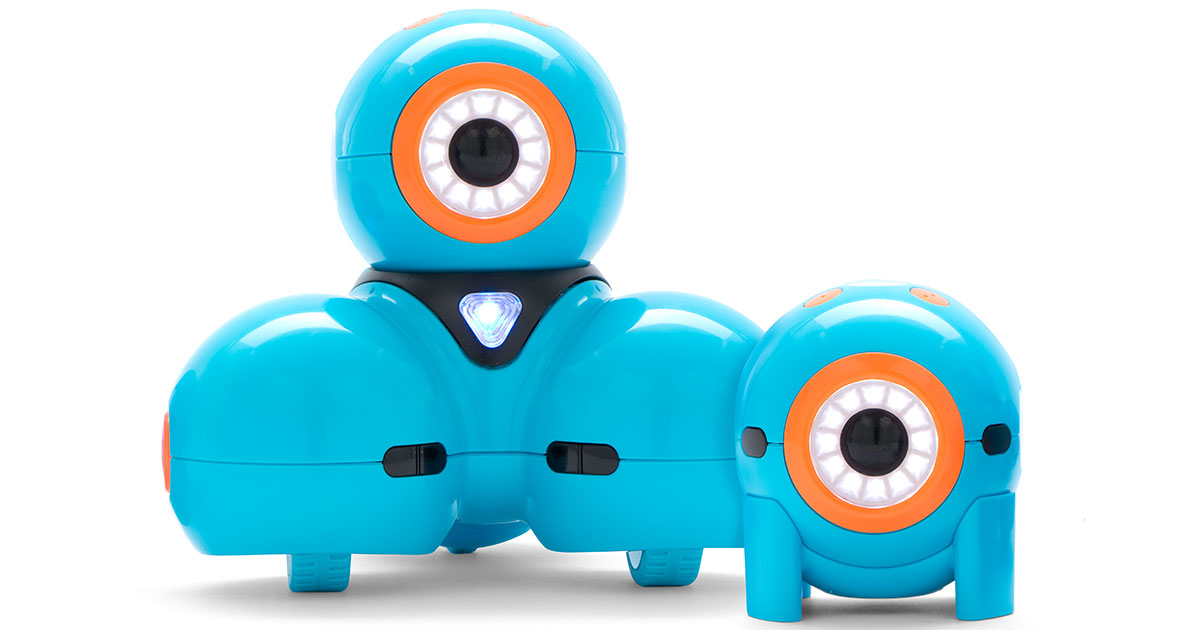
Robots like the Dash and Dot are a great way to teach pupils the basics of programming. These interactive robots can move about the floor in all directions, feel items, flash LED lights, and record and playback audio in addition to being able to record and sense objects. Dash and Dot can dodge obstacles, sing, dance, and reply to voice commands because to this capabilities.
There are several apps that interface with Dash and Dot and connect via bluetooth to a mobile device. Each of these apps helps students improve their coding skills as well as crucial 21st century abilities like creativity, problem-solving, and critical thinking.
The makers of Dash and Dot, Wonder Workshop, have created a variety of apps to aid and direct kids' learning.
Botley

Botley is a coding robot created by Learning Resources that is intended to teach fundamental coding and STEAM principles to children as young as 5 without the use of a screen. Additionally, it provides complex if/then coding logic as they advance. The basis of the code used by computer programmers and other experts is if/then logic. Botley uses a remote control to direct the robot through an obstacle course, follow a path, and more to introduce children to this reasoning.
Robot Mouse
Robot Mouse is a straightforward programmable toy that doesn't need a computer. Students input commands using the buttons on the mouse's back before pressing the green "go" button to execute the code. The challenges on the challenge cards get harder and harder to solve.
Designed for use alone or in small groups, the Robot Mouse navigates obstacles by following a path traced by children. It is incredibly easy to use, and it will help kids become more logical thinkers and improve their STEM and robotics programming skills:
Blue-Bot
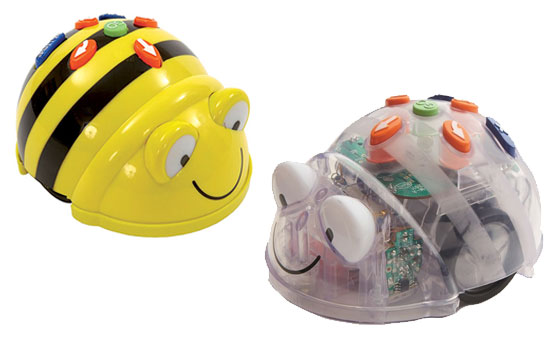
A straightforward robot called Blue-Bot may function independently or under Bluetooth control from an Android, iOS, Mac, or Windows device. Because Blue-Bot is transparent, kids can see every component that makes it function. The Blue-Bot will begin to glow after you turn it on. Choose from the following movement commands and place it on the ground: forward, backward (which will move 15 cm depending on the surface), left, and right (90-degree turns). Since the Blue-Bot can store 200 commands, pupils should be able to test the boundaries of any physical area. According to claims, the battery has a six-hour life.
Students use the Blue-Bot app to steer an on-screen Blue-Bot that moves around the screen. The Blue-Bot app includes the same controls as the Blue-Bot. Although the app is only available in English, teachers can record a voice-over for the key buttons (forward, backward, etc.) that will play when a student presses them. Students can rearrange their commands without having to clear them out because to the app's ability to display them sequentially. Additional buttons on the app enable Blue-Bot to turn 45 degrees.
Rugged Robot

The Rugged Robot has bluetooth functionality and designed for robust challenges, Rugged Robot can be controlled via tablet or the TTS TacTile Code Reader.
It can complete a large amount of difficult tasks thanks to its memory capacity of up to 256 steps. Students can choose one of three speeds for the robot's movement. Additionally, it has an obstacle sensor that can be turned on and off to help pupils be ready for the more difficult programming that will come.
The perfect programmable robot designed for outdoor use!
Related Post



Comments

Bob5604 Jan 2022
Thank you, great list of tools

Clansman14 Feb 2022
+1
